New plugin

Airchain

FM radio airchain emulation — AGC, four-band squash, emphasis, clipper and transmission artifacts behind one big SQUASH knob.

VST3 / AUmacOS14 presets
Discover Airchain
support@squaresmile.de Köln, Germany
All guides

Help Center · SoundSense

Getting started

Open a module, answer a session, read the reveal and hear your guess — and understand what the score, mastery bar, review and streak measure.

Open SoundSense

On this page
  1. Quick start
  2. Hear your guess
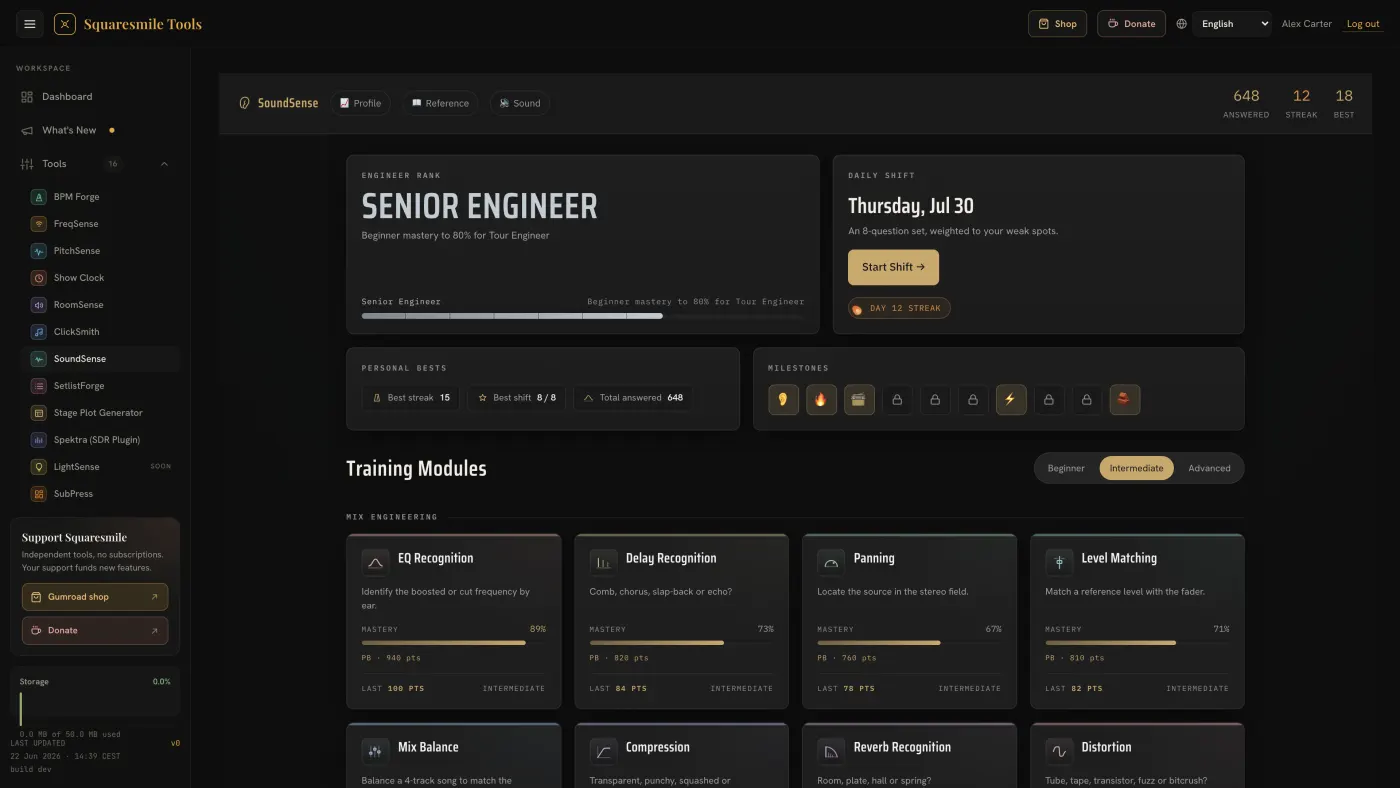
  3. The dashboard
  4. The 33 modules
  5. How scoring works
  6. Listening devices and phone-speaker mode
  7. Review of your misses
  8. Keys

SoundSense — the main screen

SoundSense is a set of training modules. A session is ten questions on one skill (eight in Mix Balance). The mix modules play recorded instrument stems; Pitch, Tempo and the psychoacoustics drills play precise test tones, noise and clicks. You answer, see the correct answer with a short note on what happened, and move on. Everything feeds a mastery bar per module and, over time, your rank.

Quick start

  1. Open SoundSense from the dashboard. For EQ, headphones or decent speakers both work — FAQ lists the modules that need headphones.
  2. Under Training Modules, pick EQ Recognition. Leave the difficulty picker on Beginner.
  3. Press ▶ Play (or Space). The stem plays with a boost applied — cuts join from level 3 of the EQ ladder (see below). A/B: Processed / A/B: Dry switches between the treated and the untreated signal.
  4. Tap the frequency scale where you hear the boost and press Confirm guess. In multiple-choice modules, tap an answer or press its number key 1–9.
  5. Read the reveal: verdict, points, the correct answer and what happened. EQ, Delay, Filter, Reverb, Pan, Level and Mix Balance also draw it. ♪ Hear correct plays the right answer. Press Next → or N.
  6. At the end the Session complete screen shows your grade, strongest and weakest calls, and a breakdown. Continue Training starts another session.

Hear your guess

After a wrong or partly right answer, ♪ Hear your guess sits next to ♪ Hear correct in 16 modules: EQ Recognition, EQ: Shelves, EQ: Low Cut, EQ: Two Moves, Filter, Delay, Reverb, Compression, Distortion, Pan, Stereo Width, Phase, Pitch, Tempo, Level and Mix Balance. Play both and compare. The reveal names both in listening words next to the numbers — for example "Your guess: 800 Hz — mud / boxy. Answer: 3.2 kHz — presence / bite." — so you learn what the difference sounds like, not only how big it was.

The dashboard

  • Engineer Rank — your rank and what the next one needs.
  • Daily Shift — one eight-question shift per day, and the show-day warm-up. See Run a Daily Shift and climb the ranks.
  • Review — the card shows how many concepts are due for review. See Review of your misses below.
  • Personal Bests and milestone badges.
  • Training Modules — the three wings, Games (the Ring-Out Simulator) and Your ears (the hearing check); each training card has its mastery bar.
  • Your weakest area — the module dragging your average down.
  • Top bar: 📈 Profile (EQ accuracy by band, flat/sharp tendency, per-module accuracy), 📖 Reference (a searchable glossary — searches like "3 kHz" or "40 ms" work) and 🔊 Cues on / 🔇 Cues off — one switch for the answer cue sounds (the chime after each answer). The same switch sits inside every module.
  • A sync badge appears when your progress is not on your account yet. See Troubleshooting.

The 33 modules

Wing Plays Modules
Mix Engineering (22) recorded stems EQ Recognition, EQ: Shelves, EQ: Low Cut, EQ: Two Moves, Filter Type · Compression, Compressor match, Gate match, Distortion, Saturation match · Delay, Delay time match, Reverb, Reverb decay match · Level, Mix Balance, Pan, Stereo Width, Phase · Which is louder?, Q width, Name the ring
Musicianship (2) test tones, clicks Pitch, Tempo
Psychoacoustics (8) test tones, noise, clicks (Loudness War: stems) Haas Effect, Equal Loudness (ISO 226), Auditory Masking, Phantom Center, Binaural Beats, Loudness War, Precedence Effect, Combination Tones
Games (1) recorded stems EQ Characters

On the dashboard, Mix Engineering sits in rows: EQ · Dynamics & drive · Time & space · Level & stereo · Quick drills. More on the newer games: EQ games: shelves, low cut, two moves, Match games: compressor, delay, reverb, saturation, gate, Quick drills: Which is louder?, Q width, Name the ring and EQ Characters.

Plus the Ring-Out Simulator under Games and the Hearing check under Your ears.

What some of them play: Auditory Masking is a band of noise with a quieter pulsed tone that may or may not be audible under it — the answer follows how masking really spreads (much further upwards than downwards). Equal Loudness uses the ISO 226:2003 curves at 60 phon. Haas Effect and Precedence Effect use clicks, with thresholds that fit clicks. The chorus in Delay is really modulated. Phantom Center plays quiet pink noise with a fade-in. Answer positions are random, so no button is "usually right".

How scoring works

  • Answers on a scale. EQ scores by how many octaves your guess was from the true frequency: 100, 80, 50 or 0 points. Level, Pan placement, Mix Balance and Equal Loudness score by how close your fader is — in Level, full points within ±0.5 dB of the target, fewer points out to ±3 dB.
  • Multiple choice. With three options an answer is right or wrong. With more, a neighbouring answer earns a little — 25 points with four options, 40 with five or six, 60 with seven or more (and 20 two steps off). Compression and Combination Tones are right or wrong.
  • Level-matched. Stems are loudness-normalised, and Compression, Distortion and Stereo Width play both sides at the same loudness, so you can't answer by level.
  • Correct answers. Only a correct answer counts towards unlocks; partial points raise your score and mastery but not that total.
  • Mastery per module is the average of your last 20 answers there.
  • Difficulty. Intermediate unlocks at 50 correct answers in total, Advanced at 150. The dashboard picker sets it for every module; not every module changes with the tier.
  • EQ levels. EQ adapts to you on eight levels, from a +12 dB boost to a +2 dB one; cuts join at level 3. Two answers in a row with 80 points or more take you up a level, a 0-point answer takes you down one, 50 points holds. The difficulty only caps how high you can climb: level 4 at Beginner, 6 at Intermediate, 8 at Advanced. The EQ card shows your level instead of a mastery bar. Twelve more games use the same ladder, and the first EQ levels let you hear your own move — see The level ladder and pre-listen.
  • Blind mode is in the four EQ games only, at Advanced: 👁 Sighted switches to 🙈 Blind ×1.5, which hides the visual hint and multiplies the score by 1.5 — on answers without pre-listen.
  • Day streak advances on the first answer you record each day. The shift streak is a separate number — see Run a Daily Shift and climb the ranks.

Listening devices and phone-speaker mode

Your browser can't tell which headphones or speakers are playing, so you name them: tap Which device are you listening on? under Training Modules, add a device (for example "studio headphones" — no personal names) and pick its type. Every answer is counted for the device in use, and EQ keeps its level per device, so a phone speaker never pulls down your headphone results. 📈 Profile shows one column per device; mastery is compared from 20 answers on a device.

Which device is in use is remembered in this browser only — a laptop and a phone on the same account each keep their own. The device names and your results per device sync with your account.

Phone-speaker mode switches on when the device is a phone speaker (or with the switch in the same sheet). Phone speakers play almost nothing below about 400 Hz and only one side, so in this mode the sound is mono, EQ only asks between 400 Hz and 10 kHz, bass stems are left out, and the stereo modules (Pan, Stereo Width, Phantom Center, Haas Effect, Precedence Effect, Binaural Beats) are hidden. Laptop speakers keep stereo, with EQ questions from 200 Hz up. All the details: Listening devices and phone-speaker mode.

Review of your misses

A wrong answer, an answer under 50 points or "I don't know" puts that concept in review — in every module, EQ, Level, Mix Balance, Equal Loudness and Phantom Center included. It is due the next day, then after 3 days, then after 7. A miss sends it back to the next day; three hits in a row (80 points or more) graduate it. The day rolls over at 04:00, so a miss after a late show still counts to that show's day.

The dashboard card shows how many are due for review. Review runs up to 8 due items, with the modules taking turns — mixed on purpose: it feels harder, and that is what makes it stick. A module session also re-asks up to 2 of its own due items first. A concept you skip with "I don't know" comes back when it is due — the next day, not later the same day.

Multiple-choice modules have an I don't know — show me & save for later button (in Delay, Filter, Pan and Reverb it reads I don't know — save for later). It reveals the answer for zero points and puts the concept in review.

Keys

Key Action
Space Play / stop
1–9 Pick that answer option
N Next question (after the reveal)

Was this page helpful?