Getting started
Convert a frequency, hear it, read the harmonics and look it up in the table — in five minutes.
On this page
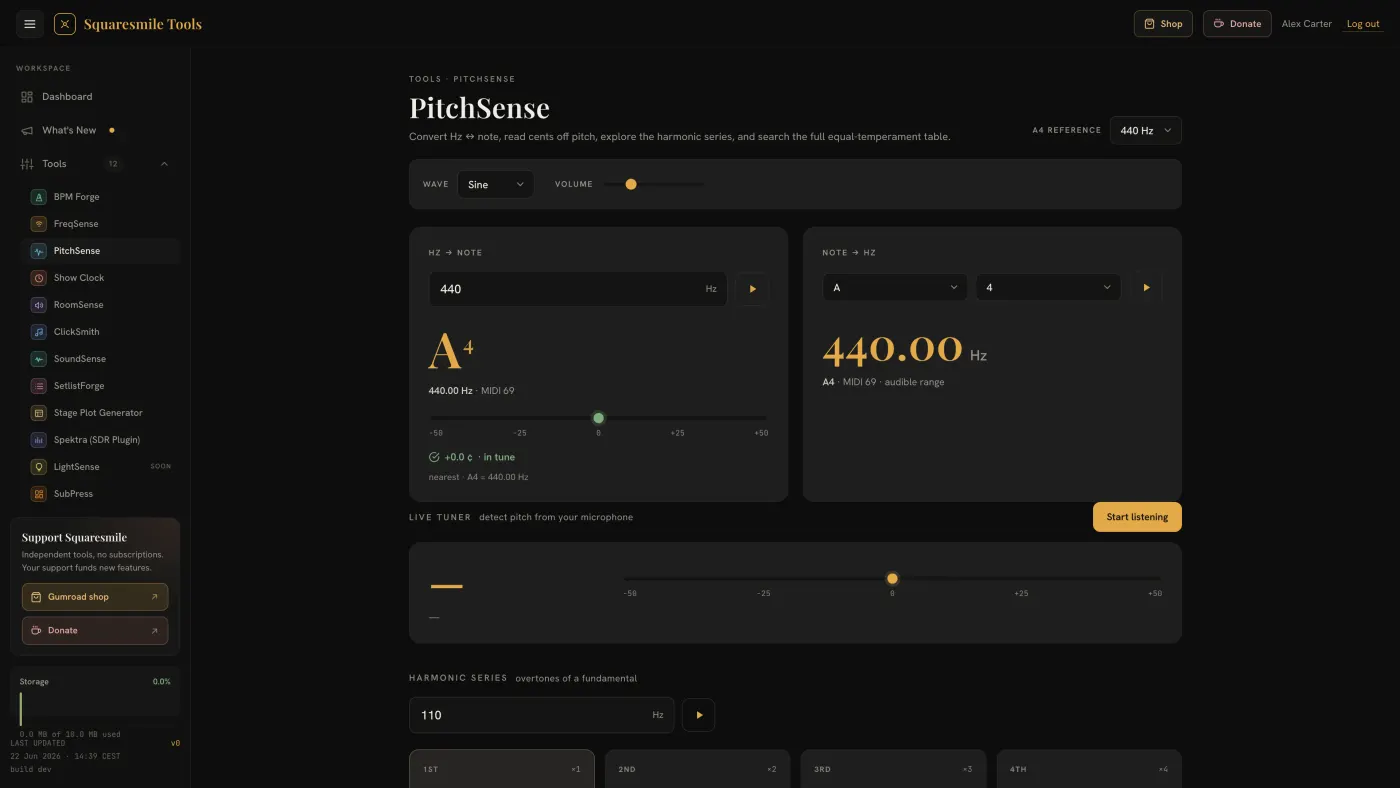
PitchSense is one page with four panels. Everything on it is calculated from the A4 reference in the top-right corner, so change that first if your ensemble does not tune to 440 Hz.
Quick start
- Open PitchSense from the dashboard.
- In Hz → Note, type the frequency you are hunting — say
315. The panel shows the nearest note, its exact frequency, its MIDI number and a cents gauge that tells you how sharp or flat 315 Hz is from that note. - Tap the play button next to the field to hear it. Wave and Volume above the panels set the tone shape and level.
- In Note → Hz, pick a note and an octave to go the other way.
- Scroll to the Reference Table and type a note, a MIDI number or a frequency into the search box to find any row from C0 to B8.
The A4 reference
The select in the header offers 432, 434, 436, 438, 440, 442 and 444 Hz; 440 Hz is the default. Changing it re-derives every readout, every harmonic and every row of the table, and the formula line at the bottom of the page updates to match. Your choice is remembered between visits and, when you are signed in, syncs to your other devices.
Hz → Note
Type any frequency from 1 to 25 000 Hz. The panel shows the nearest note with its octave, that note's exact frequency and MIDI number, and a cents gauge from −50 to +50. Within ±5 cents the readout says in tune; outside it says sharp or flat with the deviation to one decimal. An empty field shows a neutral prompt.
Note → Hz
Choose a note letter (sharps spelled with ♯) and an octave from 0 to 8. The panel shows the frequency to two decimals, the MIDI number, and whether the result sits in the 20 Hz to 20 kHz audible range.
Playback
Every value has a play button: both converters, the harmonic fundamental, each harmonic card, and every row of the reference table (tapping anywhere on a row plays it). Tones last under a second; overlapping taps are smoothed so they do not clip.
- Wave — Sine (default), Triangle, Square or Saw.
- Volume — 0 to 100, default 25.
Both are remembered along with the A4 reference.
Harmonic Series
Type a fundamental (default 110 Hz, up to 5 000 Hz) and the grid shows the first eight partials, ×1 to ×8, each with its frequency, nearest note and cents deviation. Each card has its own play button.
Reference Table
Every note from C0 to B8 — 108 rows, MIDI 12 to 119 — with octave,
MIDI number and frequency to four decimals; the A4 row is highlighted.
Search accepts note names in either spelling (C#4, Db4, F♯, Eb), a
MIDI number (69), or the start of a frequency (440, 261.6). The
counter beside the box shows how many rows match.
Live Tuner
Start listening turns on the microphone tuner. It has its own page: Tune from the microphone.
Next
- Share or bookmark a readout — the readout lives in the URL; send it or bookmark it.
- FAQ — cents, temperament and accuracy.
Thanks for the feedback.