Getting started
Load a song, lock the tempo and the offset, shape the click, and export the split WAV — the whole path in five minutes.
On this page
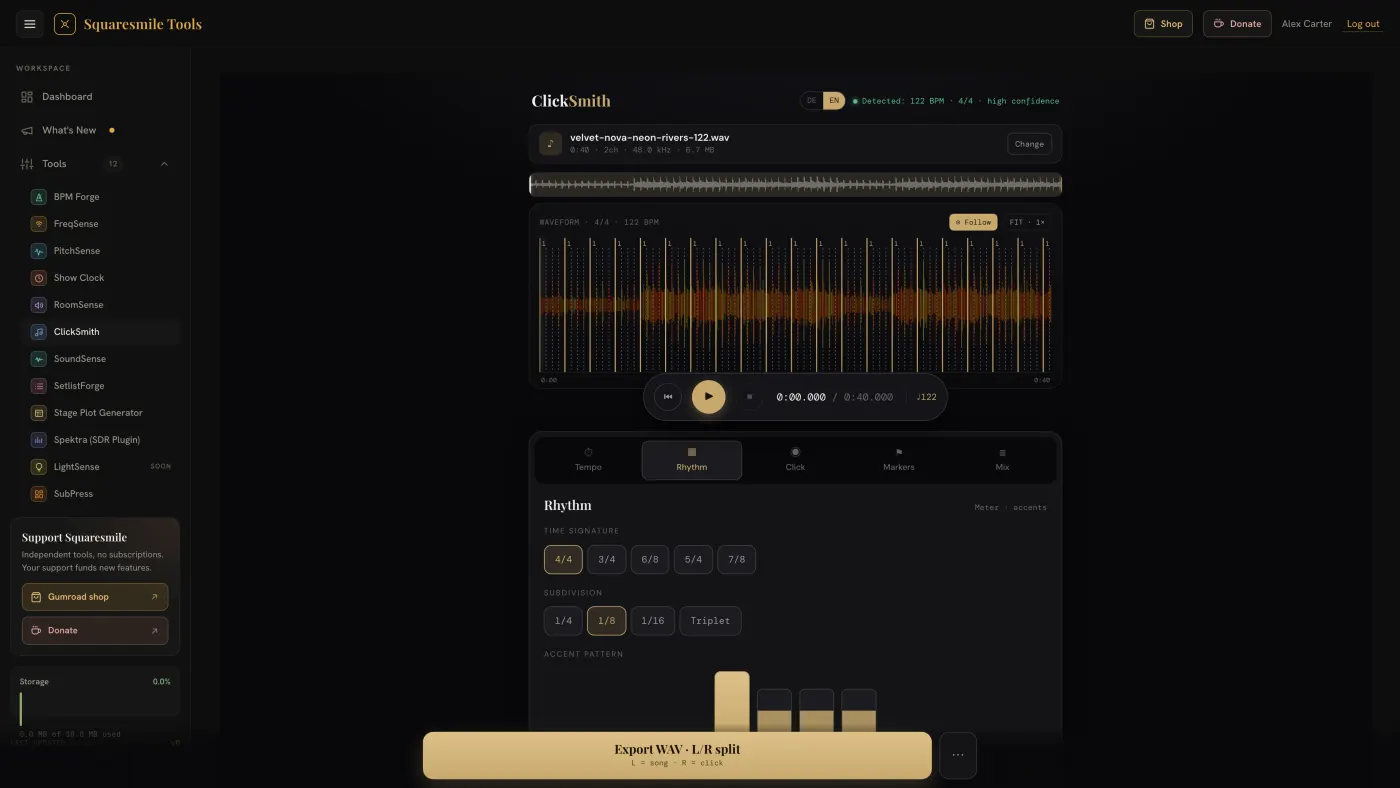
ClickSmith works on one song at a time, entirely in the browser. It is built for a laptop or tablet; the waveform and the panels also fit a phone.
Quick start
- Open ClickSmith from the dashboard and drop a file onto the page, or press Choose file. MP3, WAV, OGG or M4A, up to 200 MB. The status line reads
Decoding audio…, thenLoaded: name — duration. - Wait for Detected: … BPM in the Tempo panel, with a confidence reading. If it says
Tempo not detected, tap it in or type it. - Press ▶ and listen. Adjust the Click offset with the −10 / −1 / +1 / +10 ms buttons until beat 1 sits exactly on the first downbeat.
- In Rhythm, pick the time signature and subdivision and tap the beats of the accent pattern.
- In Click, choose a sound. Then press Export WAV · L/R split — see Export the click track.
Everything you change while playing is audible straight away: BPM, offset, metre, subdivision, accents and the tempo map all update the click you are hearing without a restart.
The screen
- Waveform — the whole song in colour with the beat grid, the cursor (white line), cues and the loop. Click to set the cursor; ⊙ Follow keeps the playhead centred; FIT · 1× resets the zoom.
- Transport — ⏮ To start, ▶ Play / Pause, ⏹ Stop, and the time readout. Pause holds your spot (
Paused at 1:23 — press play to resume); Stop and seeking go back to the start. - Five panels: Tempo, Rhythm, Click, Markers, Mix.
Tempo
- Detected shows the automatic estimate and its confidence; ↻ Re-detect runs it again.
- Tempo field with − / + for one-BPM nudges.
- Tap Tempo — four taps for an average.
- Click offset — shifts the click relative to the song in 1 ms and 10 ms steps.
- Tempo map — for songs that change tempo, see Handle a song that changes tempo.
Rhythm
- Time signature — 4/4, 3/4, 6/8, 5/4, 7/8.
- Subdivision — 1/4, 1/8, 1/16 or Triplet.
- Accent pattern — tap a beat to cycle ghost → normal → accent.
Click
Six built-in sounds — Sine, High/Low, Clap, Wood, Rim, Cowbell — or ↥ Own sample. Fine-tune synth sets Pitch, Length, Tone and Decay. Under Per beat, tap the Beat 1, Beats 2–4 or Subdivision card to give that slot its own sound (default = main sound).
Mix
Song, Click and Master levels. Set the balance you want in your ears; the Song and Click levels are baked into the export.
Keyboard on the waveform
With the waveform focused: ← / → seek one beat (Shift = one bar), I / O set loop in and out at the cursor, + / − zoom. Mouse wheel zooms, Shift+wheel scrolls, double-click resets.
Next
- Handle a song that changes tempo — when one BPM is not enough.
- Add cues, spoken markers and a rehearsal loop — cues, spoken markers and the rehearsal loop.
- Export the click track — the L/R split and the stems.
Thanks for the feedback.