Getting started
Pick a region, pin your band, coordinate the channels and save the plan — the first pass in five minutes.
Diese Seite gibt es bisher nur auf Englisch.
Auf dieser Seite
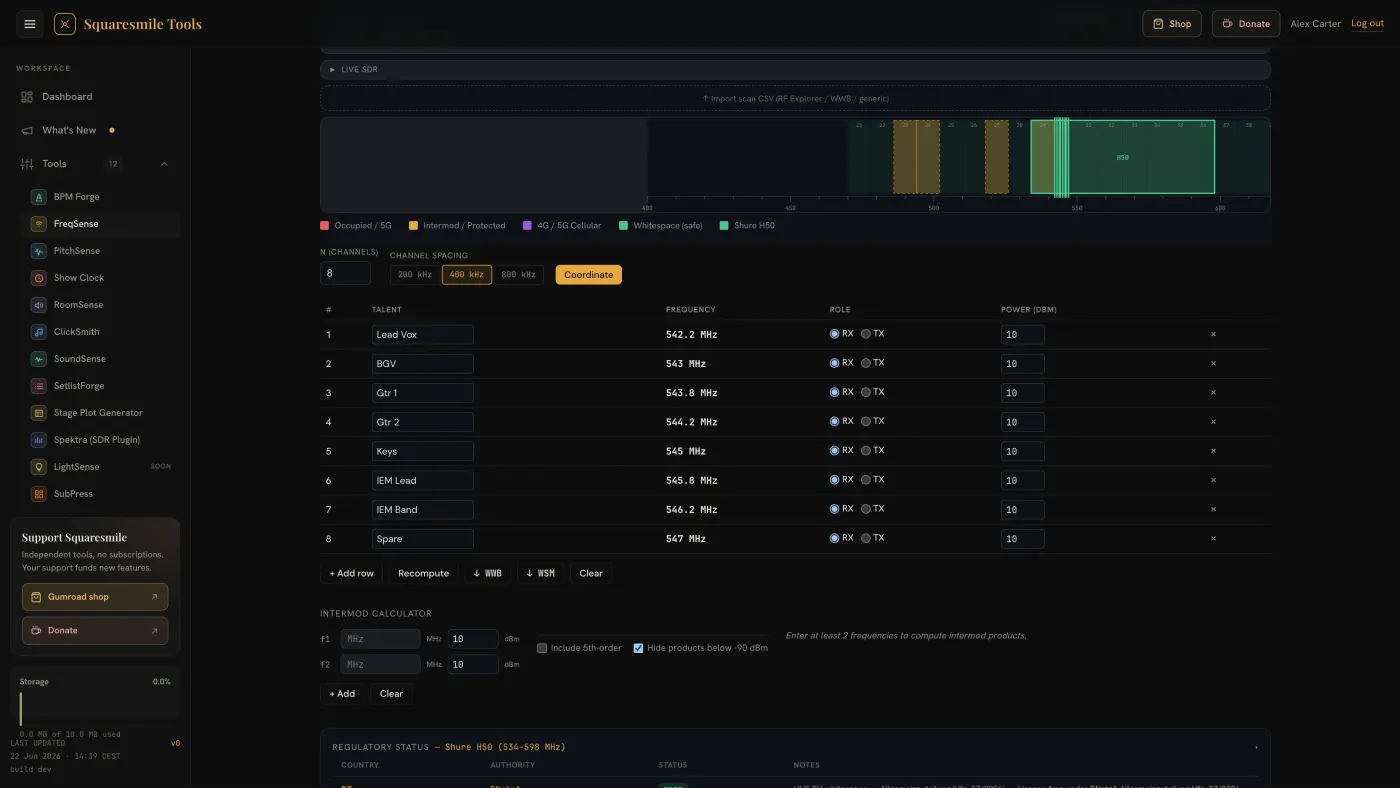
FreqSense works from two facts: the country you are in and the gear you are carrying. The spectrum picture, the safe windows and the coordinated channel list all follow from those two choices.
Quick start
- Open FreqSense from the dashboard. It needs a tablet or laptop.
- Set Region / Regulatory Framework to the country you are physically in. The spectrum redraws with that region's TV channels, cellular blocks and licence-free ranges.
- Under Manufacturer / Band Filter, type your brand, pick the Band / Model and press + Pin to spectrum. The band's tuning range appears as an overlay, so you can see whether it even reaches clean spectrum.
- In Coordinate N Channels, set N (channels) and the Channel spacing, then press Coordinate. The packer fills the table with frequencies that avoid occupied channels and 3rd-order intermod hits.
- Type the Talent and Role for each row so the sheet reads like a show.
- Open Saved plans and press + Save current. Plans sync to your account, so the plan you build on the laptop is on the tablet at the venue.
The screen
- Frequency Spectrum — the main drawing. Zoom presets: PMSE (470–694), UHF (470–960) and Full (400–960). Hover for the channel tooltip, click to pin it, or step through channels with the arrow keys. The legend separates Whitespace (safe), Occupied / 5G, 4G / 5G Cellular, Intermod / Protected and Scan trace.
- Regulatory Status — country, authority, status and notes for the selected band. Badges read Free, Required (a licence is needed), Partial, Prohibited or Outside.
- Safe Coordination Windows — a card per clear gap with its width and how many channels fit at your spacing. See Find safe windows and coordinate channels.
- Field Notes — six practical cards, collapsed by default.
- Live SDR and scan import — see Import a scan or connect an SDR.
Core concepts
- Region is a legal choice, not a preference. Band plans, licence status and duplex gaps differ per country. Germany, for example, ends licence-free UHF PMSE at 694 MHz and offers the 823–832 MHz duplex gap as a usable window; the German plan is written up at /rf-cheatsheet/funkfrequenzen-deutschland.
- Windows are the gaps left after occupied channels, guard bands and scan-flagged ranges are subtracted, sorted widest first.
- Intermod products are where your own transmitters mix and land on another channel. The packer avoids 3rd-order hits; higher-order and TX-on-RX hits are flagged for you to judge.
Saved plans, your theme, the colour-blind-safe pattern overlay and the tool language follow your account. If a plan from another device arrives while the page is open, a toast says Account data arrived — reload to see the latest.
The regulatory data is a curated snapshot, not a live feed from the regulator. Verify against the current national allocation before you transmit.
Next
- Find safe windows and coordinate channels — windows, packer and intermod in detail.
- Import a scan or connect an SDR — bring the venue's real noise floor into the plan.
- Export to WWB, WSM and paper — hand the plan to WWB, WSM or paper.
Danke für die Rückmeldung.