01
Build the library
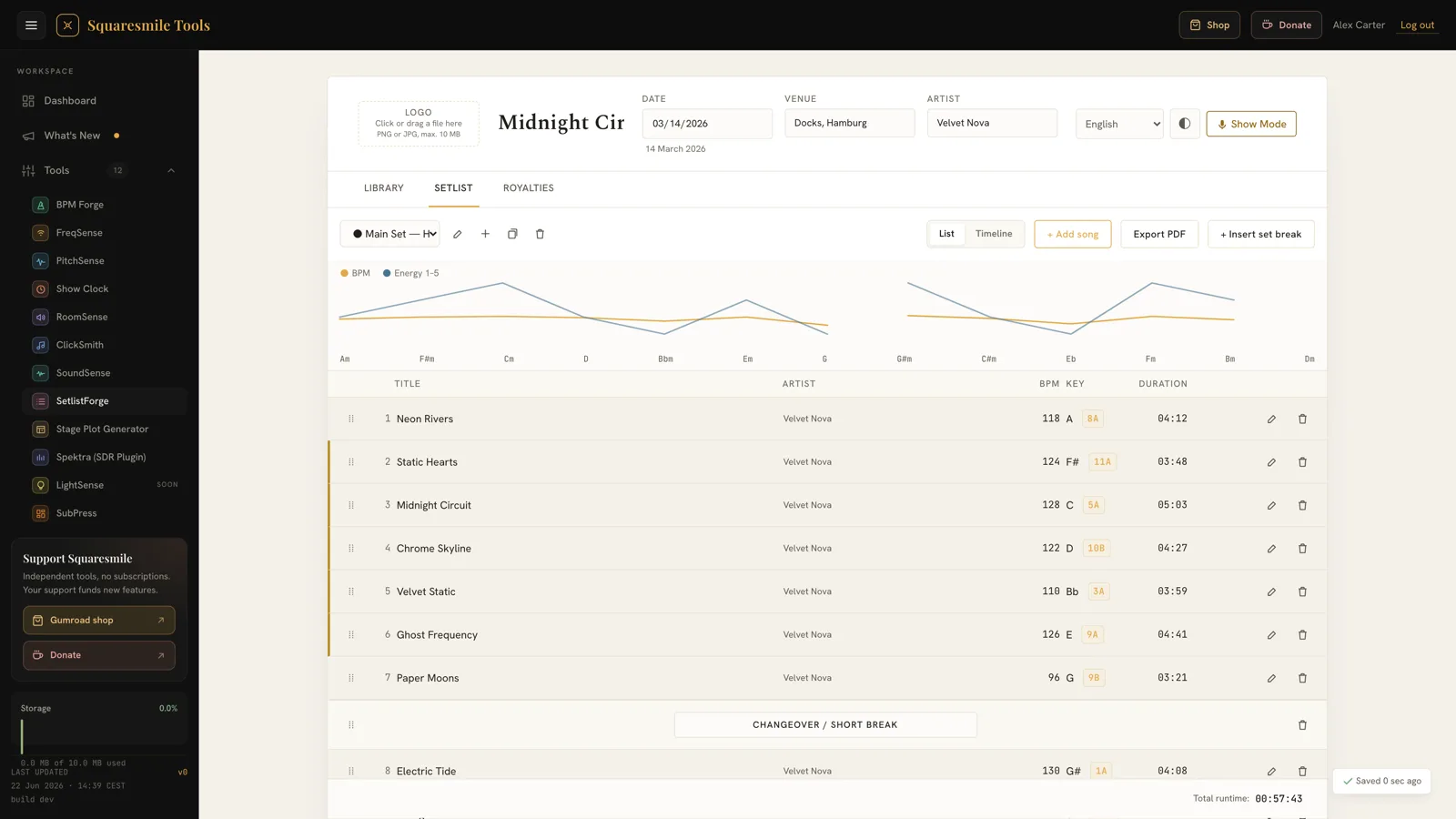
Add each song once with duration, key, BPM, notes and an audio reference. It survives every gig after that.
Premium · A Squaresmile app
A song library, drag-and-drop setlists, live runtime maths, Camelot key badges, an Energy Arc, a dark-stage Show Mode and stage-ready PDFs — plus performed-songs reports for GEMA, SUISA, ASCAP, BMI, PRS, SABAM and SOCAN. Bought once.
How it works
Add each song once with duration, key, BPM, notes and an audio reference. It survives every gig after that.
Total runtime, the wall clock with planned breaks and the slot over/under recompute live as you drag.
Camelot badges show the harmonic flow; the Energy Arc shows the dynamic curve — before the room hears it.
Show Mode for the stage, a stage-ready PDF for the deck — and the performed-songs report for your society.
The part nobody else does
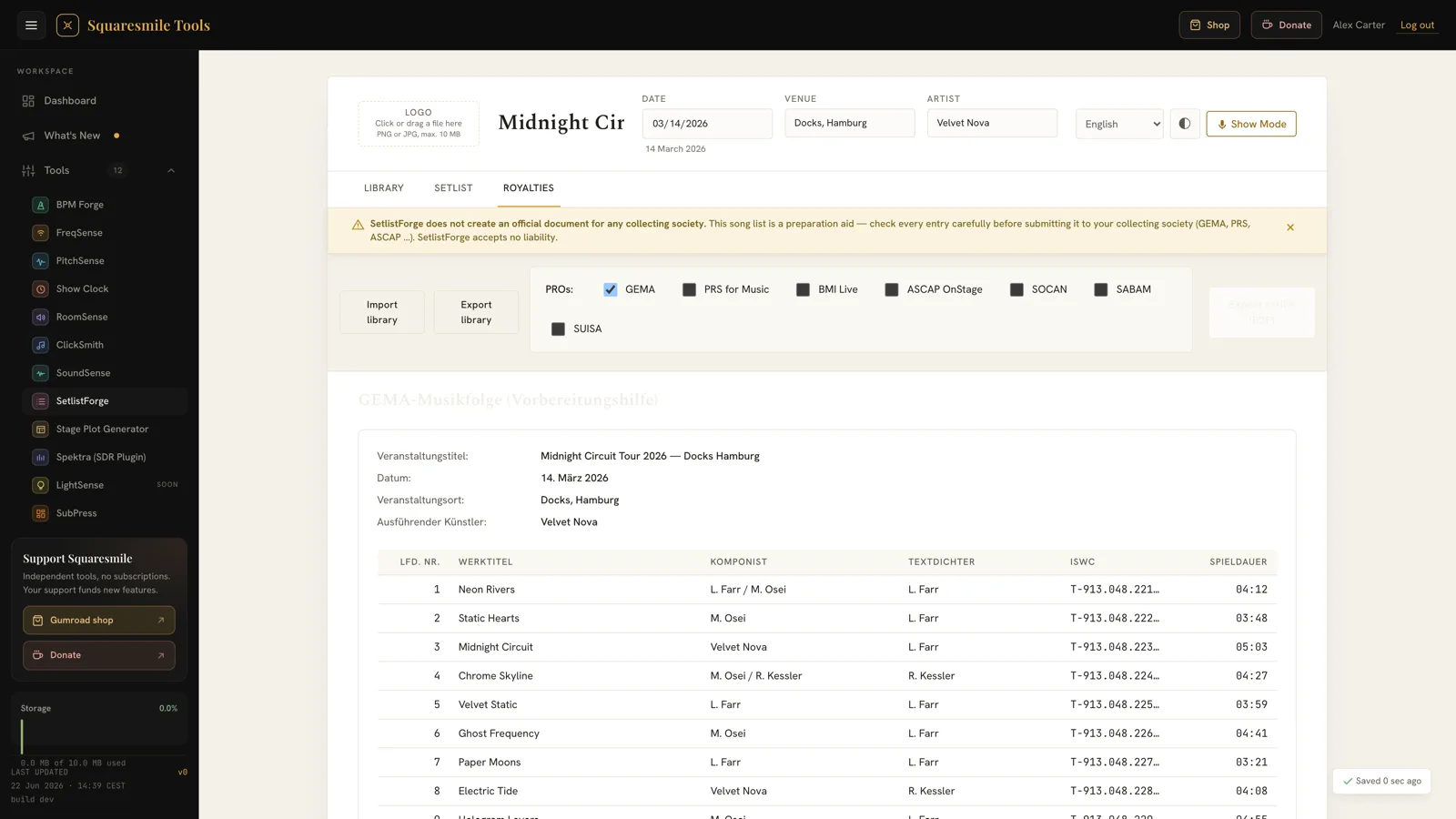
Every setlist app stops at "here is your list of songs". Unreported live performances are royalties you earned and never collected — and the reason nobody reports them is that the paperwork is miserable. SetlistForge already knows what you played and how long it ran, so it fills the form out for you.
Musikfolge — the performed-songs list, prepared
Tariff K, ticket revenue, capacity, PDF language
ASCAP OnStage, with performance time
BMI Live, with venue phone
Member number and UK venue postcode
Performer pay, ticket revenue, PDF language
Promoter phone, PDF language
These are preparation aids, not filings: SetlistForge produces the performed-songs list and the territory-specific fields each society asks for, formatted and ready to submit through their portal. It doesn't submit on your behalf — it turns an evening into ten minutes. Songs missing required fields are flagged before you export, with an "export anyway" override.
Inside the app
Features
Durations, keys, BPM, notes and an offline audio reference — entered once, searched forever. Import and export it whole.
Set totals, the wall clock with planned breaks and slot-target maths, recalculated as you drag. You know the set fits the slot before you play it.
A 34-entry harmonic lookup on every song, so you can see the key flow instead of discovering it in front of an audience.
The dynamic shape of the set as a curve — so the third song doesn't kill the room and the closer actually lands.
Editing locked, setlist enlarged, screen kept awake, dark-venue theme, explicit exit confirm. Readable from a dark stage at arm's length.
Your columns, your layout, your logo and artwork — with embedded fonts for Latin, Greek, Cyrillic and more. Batch-generate a whole multi-set night at once.
GEMA, SUISA, ASCAP, BMI, PRS, SABAM and SOCAN — each with its own fields, disclaimer and PDF language.
The laptop at FOH, the tablet on the keyboard rig. Library and setlists follow your login; 11 interface locales.
RiderSmith reads your set timings to build the schedule section of a tech rider. Plan once, reuse everywhere.
Pricing
Bought once, owned forever — in a category where nearly every rival bills you monthly. Your licence unlocks SetlistForge on your Squaresmile account, alongside every free tool the platform ships.
Who it's for
Repeatable setlists, printed for the stage, timed to the slot — and 200 gigs a year that don't each start from a blank page.
Set structure, key flow and the timing budget, visible while you build rather than discovered on the night.
The performed-songs report that turns into money. The one part of the job that pays you for doing it.
FAQ
No — and be wary of anything that claims to. SetlistForge produces the performed-songs list and the fields the society asks for, formatted and ready to submit through their own portal. It turns an evening into ten minutes.
GEMA, SUISA, ASCAP, BMI, PRS for Music, SABAM and SOCAN — with per-society PDF disclaimers, table headers in the society's language, and regional variants (de-CH, fr-BE, fr-CA, fr-CH, it-CH, nl-BE, en-CA).
No. This is the production side — timing, print and paperwork. Pair it with your chart app of choice; we're not trying to replace one.
Licences are per account today, so it's your library on your login. Share the printed PDF with the rest of the band. A proper band workspace is on the roadmap, and we'd rather say that plainly than imply it already exists.
Yes — tablet and laptop, in the browser, no App Store. Phones work too with a layout adapted to small screens — bigger screens stay the comfortable place to build.
No. One purchase through Gumroad, claimed to your Squaresmile account.
Ready when you are
Create a free Squaresmile account, unlock SetlistForge once, and stop retyping the same songs before every gig.
The Squaresmile suite
Every browser tool below is free the moment you sign up. Create one account and the whole toolbox follows you from gig to gig — no installs, no app store.
Show day
 Show ClockPremium
Stage timer & run-of-show with 3 s crew sync
Show ClockPremium
Stage timer & run-of-show with 3 s crew sync
 Stage Plot GeneratorPremium
Stage plots, input lists & DMX patch in one doc
Stage Plot GeneratorPremium
Stage plots, input lists & DMX patch in one doc
 RiderSmithPremium
Tech riders in 11 languages, assembled from your tools
RiderSmithPremium
Tech riders in 11 languages, assembled from your tools
Plan the rig
 RF CoordinationFree
Find safe wireless-mic windows for DE / UK / US / EU
RF CoordinationFree
Find safe wireless-mic windows for DE / UK / US / EU
 PowerSenseFree
Loads per phase, cable checks & distro headroom
PowerSenseFree
Loads per phase, cable checks & distro headroom
 RiggingSenseFree
Bridle & truss statics, taught step by step
RiggingSenseFree
Bridle & truss statics, taught step by step
 RoomSenseFree
Acoustic reference: room modes, SPL, LUFS & EQ
RoomSenseFree
Acoustic reference: room modes, SPL, LUFS & EQ
 MicSenseFree
Mic reference for live — specs, response curves & polar patterns
MicSenseFree
Mic reference for live — specs, response curves & polar patterns
Train your senses
 SoundSensePremium
Ear training on real stems — 21 modules
SoundSensePremium
Ear training on real stems — 21 modules
 PitchSenseFree
Hz ↔ note converter, cents meter & reference tones
PitchSenseFree
Hz ↔ note converter, cents meter & reference tones
Studio & prep
 ClickSmithFree
Turn any song into an L/R click track (WAV)
ClickSmithFree
Turn any song into an L/R click track (WAV)
 BPM ForgeFree
Tap tempo, metronome, tuner & per-song setlists
BPM ForgeFree
Tap tempo, metronome, tuner & per-song setlists
 TempoSenseFree
Hears the tempo — live BPM, ÷2 / ÷4 / ÷8 layers, delay times & MIDI out
TempoSenseFree
Hears the tempo — live BPM, ÷2 / ÷4 / ÷8 layers, delay times & MIDI out
 LoudSenseFree
LUFS, true peak & clips for any file — verdict per platform, nothing uploaded
LoudSenseFree
LUFS, true peak & clips for any file — verdict per platform, nothing uploaded
Desktop & plugins


