New plugin

Airchain

FM radio airchain emulation — AGC, four-band squash, emphasis, clipper and transmission artifacts behind one big SQUASH knob.

VST3 / AUmacOS14 presets
Discover Airchain
support@squaresmile.de Köln, Germany
German-engineered RF coordination · SDR hardware from ~€40

Find clean frequencies before the downbeat.

Klar — clear. Funk — radio. KlarFunk sweeps the UHF wireless-mic band in seconds on an SDR from around €40: live spectrum with waterfall, clear free/occupied verdicts, and a Frequency Advisor that turns the measured gaps into an intermod-safe, printable coordination plan in one click. Built in Germany, for stages that do not get a second take.

Works offline at the venue Double-click app · no Python Free download · no account · 14-day full trial 7 languages · 14 regulator regions
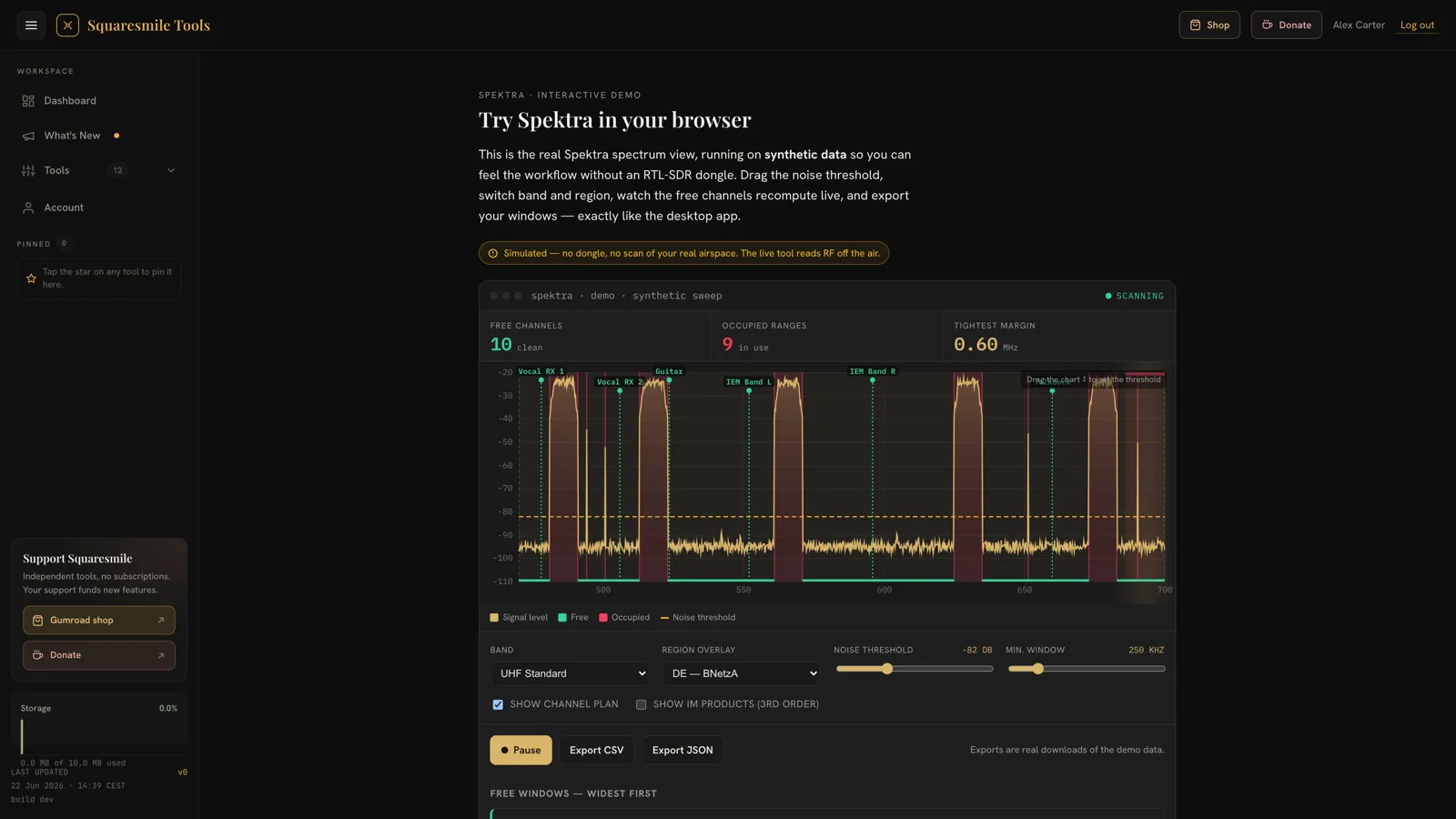
KlarFunk’s spectrum view in its browser demo, on synthetic data: a 470–700 MHz sweep with labelled carriers such as Vocal RX 1 and IEM Band L, occupied ranges shaded red and free ones green. The sweep is paused and the noise threshold dragged on the chart: up to −61 dB, then down into the noise floor at −99 dB, where everything counts as occupied — 0 free channels, 1 occupied range — and back to −82 dB, 10 free and 9 occupied.
The KlarFunk browser demo on synthetic data — the desktop app draws the same view from real RF.
39
Device families
14
Regulator regions
IM3
2- and 3-transmitter intermod check
7
Interface languages
Everything for coordination

One tool from scan to soundcheck

KlarFunk covers the whole pre-show RF workflow — sweep the band, read what's free, lay out your channel plan, and hand off clean numbers to the stage.

Live spectrum + waterfall

Full 470–700 MHz UHF sweep in a few seconds, ~1-second cold start, band presets for DECT and 2.4 GHz — hardware permitting up to 6 GHz. Live waterfall works on RTL-SDR and in demo mode. Every other device gets the sweep-history strip instead — one row per completed sweep, on every device.

Frequency Advisor

Coordinated, intermod-checked suggestions placed inside the actually measured free windows — third-order products of two transmitters (2A−B) and of three (A+B−C), Robust and High-density profiles, and deterministic results: a reprinted plan always matches the printed one.

RTL-SDR, tinySA, RF Explorer — one picker

RTL-SDR (from ~€40), tinySA & tinySA Ultra and RF Explorer — auto-detected on plug-in. HackRF One and Airspy are recognised too (Apple Silicon macOS only — hardware-unverified). No hardware yet? Demo mode generates a synthetic spectrum for training.

Smart 3-state occupancy

Not a dumb threshold: KlarFunk distinguishes your own carriers (green) from contention on your channel (amber) and unknown interference (red) — with a suggest-threshold helper for the noise floor.

39 device families & regulation

Shure, Sennheiser, Lectrosonics, Sony and budget channel-wheel gear — group/channel picks resolve to exact MHz. Regulation overlays for 14 regions tint TV whitespace and give each device a license verdict.

Listen, snapshot & hand off

On an RTL-SDR, FM-demodulate and listen to any parked frequency with squelch and level meter (FM only — digital wireless sounds like noise). Save and compare sweeps, export scans as CSV/JSON — and hand guest crews the Advisor's coordination CSV or printable A4 PDF with spectrum snapshot.

Straight off the screen

The spectrum view, reading a band

The same view you'll run at the venue — captured here in the free browser demo on a synthetic sweep: 10 free channels, 9 occupied ranges, the noise threshold and the channel plan overlaid.

The KlarFunk browser demo on synthetic data: the spectrum, then band, region overlay, noise threshold and minimum window, the CSV and JSON export buttons, and the free windows widest first, each with its width and centre frequency.
Free in green, occupied in red, tightest margin in MHz — drive this exact view yourself in the live demo; the desktop app draws the same picture from real RF.
Up and running in minutes

How KlarFunk works

No rack of gear, no lab analyzer, no install marathon. A dongle and a double-click.

1

Plug in & launch

Connect a supported analyzer — KlarFunk auto-detects it and cold-starts in about a second. No Python, no Homebrew, nothing to compile; on Windows, run 'KlarFunk - Install RTL-SDR Driver' once from the Start menu first.

2

Scan the band

Sweep the UHF band in seconds, watch the waterfall (live on an RTL-SDR, sweep history on every device), and read the 3-state verdicts: your carriers green, contention amber, intruders red — every usable gap listed.

3

Coordinate & go

One click on the Frequency Advisor places intermod-checked frequencies inside the measured gaps — print the A4 coordination sheet and hand it to the stage.

Built for any crew

Speaks your language. Suits your venue.

The interface ships in seven languages and switches instantly — no reload. Dark mode for the FOH position, light mode for daylight load-in, with a tunable accent so it fits your rig.

EnglishDeutschFrançaisEspañolItalianoNederlandsPortuguês
Dark
Light
Why KlarFunk

German engineering, without the German-engineering invoice

The coordination work that actually decides your show day — done properly, deterministically, and for a fraction of the cost of a dedicated suite or lab hardware.

Capability KlarFunk
Best value
Free manufacturer software Pro coordination suite Lab spectrum analyzer
Typical cost€49 + €40 dongleFreetypically €1,000–4,000typically €2,000–10,000+
Live RF scanning + waterfall✓RF scans✓✓
Automatic free-channel detection✓Not stated✓—
Intermod check (IM3: 2A−B and A+B−C)✓Not stated✓—
Own-carrier vs. interference detection✓Not statedPartial—
Printable coordination sheet (PDF)✓Not stated✓—
Multi-region regulatory overlays✓ 14 regionsNot stated✓—
Listen to a frequencyFM audio, RTL-SDR only (digital systems sound like noise)Not statedNot statedNot stated
Absolute dBmOn tinySA / RF Explorer; relative dB on RTL-SDRNot statedNot stated✓
Controls your receiversNo✓ that maker'sNot stated—
Not tied to one maker's receivers✓Mainly one makerNot stated✓
Runs on a low-cost USB dongle✓Not stated——
Pocket-sized & portable✓Not statedLaptop + receiverBench unit

“Not stated” means we make no claim either way. Other prices are typical ranges, not quotes.

Regional rules

14 regions, from the regulators' own documents

DE, AT, CH, UK, EU/CEPT, US, FR, NL, BE, IT, ES, AU, JP and CA. Each region's table comes from its regulator's documents. Every device you register gets a verdict: license-free, registration required or forbidden. The Advisor never suggests a frequency the table marks as forbidden, and a band with no source reads “Outside known regulatory bands”.

A planning aid, not legal advice. Check the current national rules before a show.

About the €40 dongle

What a cheap SDR can do, and what it cannot

An RTL-SDR costs about €40 and covers the whole 470–700 MHz UHF mic band. It is a receiver stick, not a lab instrument.

RTL-SDR, about €40

Live waterfall and Listen. Levels are relative dB, not calibrated dBm: the shape of the trace and where it sits against the threshold is what counts.

tinySA Ultra or RF Explorer

Calibrated absolute dBm from the analyzer's own firmware. No live waterfall: you get the sweep-history strip, one row per completed sweep. No Listen.

Where it stops

Less dynamic range and coarser readings than a lab spectrum analyzer. Two scanners on the same antenna can differ by 10–20 dB.

When to step up

When you need levels you can quote in dBm, use an analyzer. When you need measurements someone signs off, use a lab instrument.

What you need

Minimal kit. Maximum coverage.

An SDR or analyzer

A ~€40 RTL-SDR, a tinySA or an RF Explorer — auto-detected on plug-in. Or start in demo mode with no hardware at all.

A Mac or Windows PC, one double-click

Ships as a compact desktop app for macOS (Apple Silicon & Intel) and Windows. No Python, no Homebrew, nothing to compile. On macOS there's nothing to install — the RTL-SDR library ships inside the app. On Windows, run 'KlarFunk - Install RTL-SDR Driver' once from the Start menu (the installer puts it there), then plug in and go.

KlarFunk is not notarised by Apple yet. On first launch, macOS will block it once; the Getting Started guide shows the one-line Terminal command that clears this.

Nothing else

Works fully offline at the venue. No account, no telemetry; it binds to localhost only. It goes online only when you ask: once to activate a licence key with Gumroad, and for the update check, which is off by default.

Free trial, then a one-time license

Download free — no account — and every install runs a 14-day full-feature trial. To keep scanning real RF, buy a key once on Gumroad for €49 and enter it in the app: 3 computers per key, updates for the version you own, no subscription.

Licences & source

Licences & source

One app, two licences. KlarFunk's desktop app — the shell you install and the interface you see — is proprietary software covered by the KlarFunk EULA. The scanning engine inside it is free software under the GNU GPL v3 (or later), and its complete source code is published here with every release, so you can read it, build it and change it.

Engine source code current release 4.0.0

VersionDownloadSHA-256
4.0.0 klarfunk-engine-src-4.0.0.zip (188 KB) ce30a81cab170993247ea4aa08e9b590b0d6386bee1fb3a707a53f8e49aff8ba
3.19.0 spektra-engine-src-3.19.0.zip (180 KB) cdbb16a0d7db9af5b1f257f3e2d5ab43afe55df28e8a5c413700ec53b21be224

The archive corresponds to the engine bundled in the 4.0.0 installers. Source for the native libraries listed in the third-party notices (librtlsdr, libusb and friends) is available from their upstream projects or on request from support@squaresmile.de.

Questions about licensing: support@squaresmile.de

Questions, answered

Frequently asked

What hardware do I need to run KlarFunk?
An RTL-SDR — the RTL-SDR Blog V3 is the ~€40 reference device, generic RTL2832U dongles work too — or a tinySA / tinySA Ultra or an RF Explorer WSUB1G / 3G Combo, auto-detected on plug-in. HackRF One and Airspy are recognised as well (Apple Silicon macOS only — hardware-unverified). Live waterfall works on RTL-SDR and in demo mode. Every other device gets the sweep-history strip instead — one row per completed sweep, on every device. No hardware yet? A built-in demo mode generates a synthetic spectrum so you can learn the app first.
Which bands and regions does it cover?
The default sweep covers the 470–700 MHz UHF wireless-mic band in a few seconds, with presets for DECT (1880–1900 MHz) and 2.4 GHz — and capable hardware can tune up to 6 GHz. Regulation overlays for 14 regions (DE, AT, CH, UK, EU/CEPT, US, FR, NL, BE, IT, ES, AU, JP, CA) tint TV whitespace and give each registered device a license verdict: license-free, registration required, or forbidden. A planning aid, not legal advice: check the current national rules before a show.
Does it replace professional coordination software?
For the pre-show workflow, it closes the whole loop: sweep the band, read what is genuinely free, and let the Frequency Advisor place intermod-checked frequencies inside the measured gaps — then print the plan as an A4 PDF. What it does not do is remote-control receivers the way manufacturer suites do for their own gear.
How do I download and buy it?
Download it free from this page — no account needed. Every install runs a 14-day full-feature trial; after that KlarFunk is demo-only until you enter a license key. Buy the key once on Gumroad for €49 — one key works on 3 computers, and updates for your major version are included. KlarFunk ships for macOS (Apple Silicon & Intel) and Windows. No Python, no Homebrew, nothing to compile. On macOS there's nothing to install — the RTL-SDR library ships inside the app. On Windows, run 'KlarFunk - Install RTL-SDR Driver' once from the Start menu (the installer puts it there), then plug in and go.
Can I use it without internet?
Yes. KlarFunk works fully offline: it talks to your analyzer over USB and binds to localhost only. No account, no telemetry, no cloud. It goes online only when you ask it to — once to activate a licence key with Gumroad, and for the update check, which stays off until you switch it on.
What languages and themes are supported?
Seven interface languages — English, German, French, Spanish, Italian, Dutch and Portuguese — with light and dark themes and a tunable accent color.
Stop guessing. Start scanning.

Download KlarFunk free — no account needed. Every install runs a 14-day full-feature trial; after that, a license key from Gumroad keeps it scanning real RF.

Free download · 14-day full-feature trial · then €49 one-time license, 3 computers per key · updates for your major version · Which Mac? Apple menu → About This Mac

The Squaresmile suite

More tools on Squaresmile — one free account

Tools marked Free are yours the moment you sign up; Premium tools and plugins are paid. One account keeps the whole toolbox with you from gig to gig — the browser tools need no install and no app store.

Show day

Plan the rig

Train your senses

Studio & prep

Desktop & plugins