01
Drop the file
WAV, MP3, AAC, FLAC or OGG, up to 1 GB. Several at once if you want to compare a master with its MP3.
Free · A Squaresmile app
LoudSense shows what Spotify, Apple Podcasts or the broadcaster will see: peak, true peak, clips, LUFS and loudness range on a waveform — and a verdict per platform with the fix in dB. The file never leaves your device.
How it works
WAV, MP3, AAC, FLAC or OGG, up to 1 GB. Several at once if you want to compare a master with its MP3.
The browser decodes the file in chunks and measures as it goes. A two-hour recording costs the same memory as a jingle. Nothing is sent anywhere.
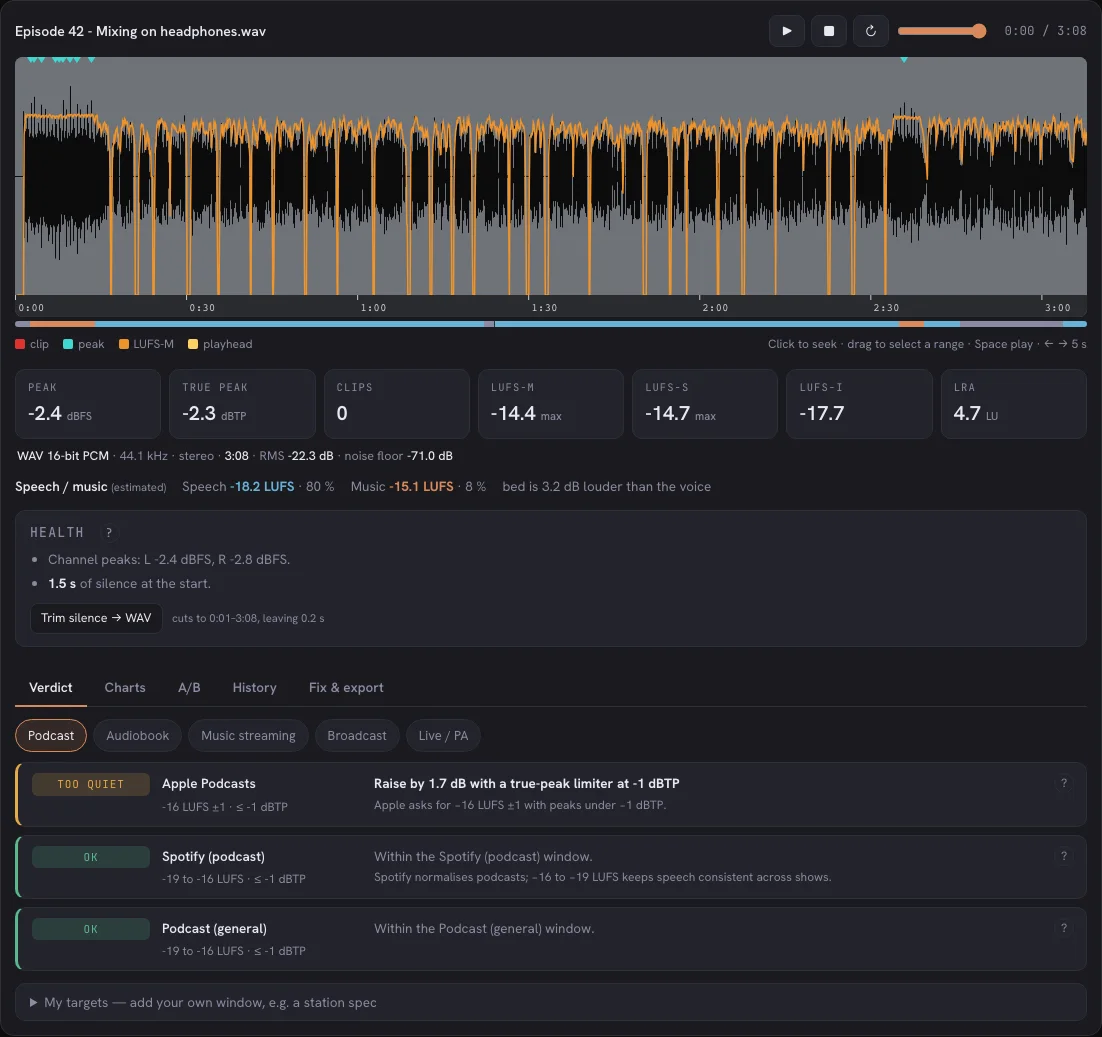
The waveform with red clip marks, cyan peak marks and the orange loudness curve; peak, true peak, clips, LUFS-M, LUFS-S, LUFS-I and LRA underneath. Play it back with a playhead.
Pick Podcast, Music, Broadcast or Live. Every platform row says OK, too loud, too quiet or peaks too hot — and by how many dB. Copy the report.
Features
Sample peak says −0.2. True peak at 4× oversampling says +0.4. The second one is what the encoder and the platform see. LoudSense shows both.
Runs of full-scale samples are counted and drawn on the waveform, so you see where the mix hits the ceiling — and whether it was the master or the MP3 encoder.
Spotify, Apple Music, YouTube, Amazon, Tidal, Apple Podcasts, EBU R128, club and festival PA. Each with the consequence ("turned down by 2.3 dB") and the fix.
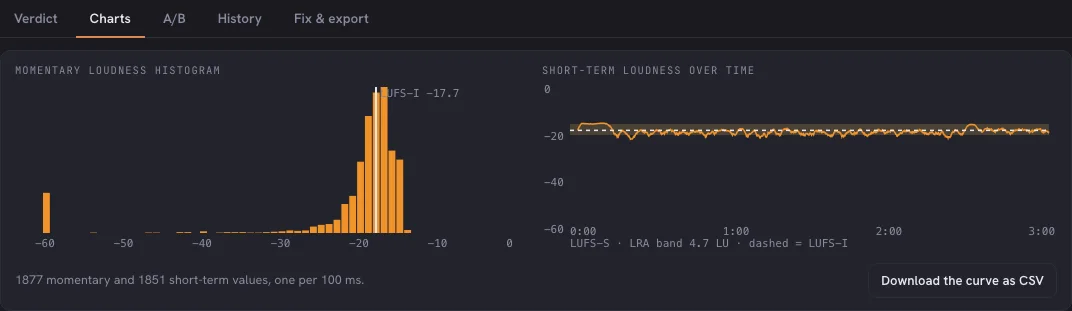
The momentary-loudness curve over the waveform shows where an episode drifts and where a song's chorus lands, not just one number for the whole file.
One click writes a WAV at the target with a true-peak limiter, original untouched. Encode preview runs your file through an MP3 encoder in the browser and shows what it does to the peaks — before you upload.
No upload, no server, no storage. Your unreleased single or client episode stays on your machine — there is nothing to delete because nothing left.
Beyond the numbers
A strip under the waveform marks where the file is voice and where it is music, with a loudness for each — so you know whether the intro bed sits 4 dB over the host before the listener does.
Every file you check is remembered in your browser, numbers only. The next episode of the same series shows a trend line and warns when episodes drift more than 2 LU apart.
Play two files in sync and flip between them with the louder one turned down to match — compare the sound, not the volume. Or hear one file exactly as Spotify or Apple would play it.
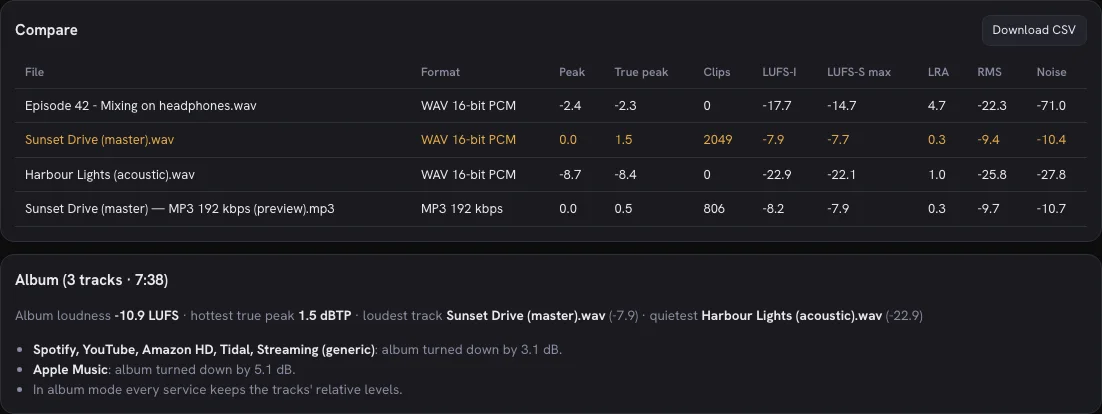
Drop an album, a playlist or a season: up to 100 files analyse in name order, land in one compare table and give you the album loudness the services normalise by.
A station spec, a client's house rule, a festival's playback level: add it once with tolerance and ceiling, get a verdict row like any platform, and it follows you to the next device with your account.
A loudness histogram and the short-term curve with the LRA band, the curve as CSV for a spreadsheet, the panel as PNG — and on a phone with the app installed, LoudSense appears in the share sheet.
In the tool

FAQ
No. LoudSense decodes and measures the file in your browser. Nothing is sent to a server, nothing is stored, and there is nothing to delete afterwards.
Lossy encoding changes the waveform slightly and can push peaks above full scale by up to a decibel. A master at −0.2 dBFS can come out of the encoder at +0.1. Leave about 1 dB of true-peak headroom before encoding, and check the encoded file.
Up to 1 GB. WAV and MP3 stream, so memory stays flat in Chrome, Edge and Safari 17+. Other formats and older browsers decode the whole file at once — 250 MB on a laptop, 60 MB on a phone.
For loudness, yes: Fix it applies the gain and a true-peak limiter at the target's ceiling and downloads a WAV, original untouched. Encode preview shows what the MP3 encoder will do to your peaks before you upload. Noise, phase and DC still need the DAW.
Ready when you are
Create a free Squaresmile account and you're in — one login unlocks LoudSense and every other Squaresmile app.
The Squaresmile suite
Every browser tool below is free the moment you sign up. Create one account and the whole toolbox follows you from gig to gig — no installs, no app store.
Show day
 Show ClockPremium
Stage timer & run-of-show with 3 s crew sync
Show ClockPremium
Stage timer & run-of-show with 3 s crew sync
 Stage Plot GeneratorPremium
Stage plots, input lists & DMX patch in one doc
Stage Plot GeneratorPremium
Stage plots, input lists & DMX patch in one doc
 SetlistForgePremium
Setlists with timing, keys & royalty reports
SetlistForgePremium
Setlists with timing, keys & royalty reports
 RiderSmithPremium
Tech riders in 11 languages, assembled from your tools
RiderSmithPremium
Tech riders in 11 languages, assembled from your tools
Plan the rig
 RF CoordinationFree
Find safe wireless-mic windows for DE / UK / US / EU
RF CoordinationFree
Find safe wireless-mic windows for DE / UK / US / EU
 PowerSenseFree
Loads per phase, cable checks & distro headroom
PowerSenseFree
Loads per phase, cable checks & distro headroom
 RiggingSenseFree
Bridle & truss statics, taught step by step
RiggingSenseFree
Bridle & truss statics, taught step by step
 RoomSenseFree
Acoustic reference: room modes, SPL, LUFS & EQ
RoomSenseFree
Acoustic reference: room modes, SPL, LUFS & EQ
Train your senses
 SoundSensePremium
Ear training on real stems — 21 modules
SoundSensePremium
Ear training on real stems — 21 modules
 PitchSenseFree
Hz ↔ note converter, cents meter & reference tones
PitchSenseFree
Hz ↔ note converter, cents meter & reference tones
Studio & prep
 ClickSmithFree
Turn any song into an L/R click track (WAV)
ClickSmithFree
Turn any song into an L/R click track (WAV)
 BPM ForgeFree
Tap tempo, metronome, tuner & per-song setlists
BPM ForgeFree
Tap tempo, metronome, tuner & per-song setlists
 TempoSenseFree
Hears the tempo — live BPM, ÷2 / ÷4 / ÷8 layers, delay times & MIDI out
TempoSenseFree
Hears the tempo — live BPM, ÷2 / ÷4 / ÷8 layers, delay times & MIDI out
Desktop & plugins


