Show Clock · Multi-stage wall
Every stage of the festival on one screen.
The multi-stage wall puts 2–5 Show Clock stages side by side on a TV, a projector or a landscape tablet — the act on each stage, its countdown, what comes next, how late it runs and how close it is to curfew. Each stage keeps its own operator; the wall only shows.
What the wall is
A wall is one web page that shows 2–5 Show Clock share links side by side — one lane per stage. Put it on the TV at the stage manager’s desk, the projector in the production office or a tablet in landscape, and every stage of the festival is in view at once.
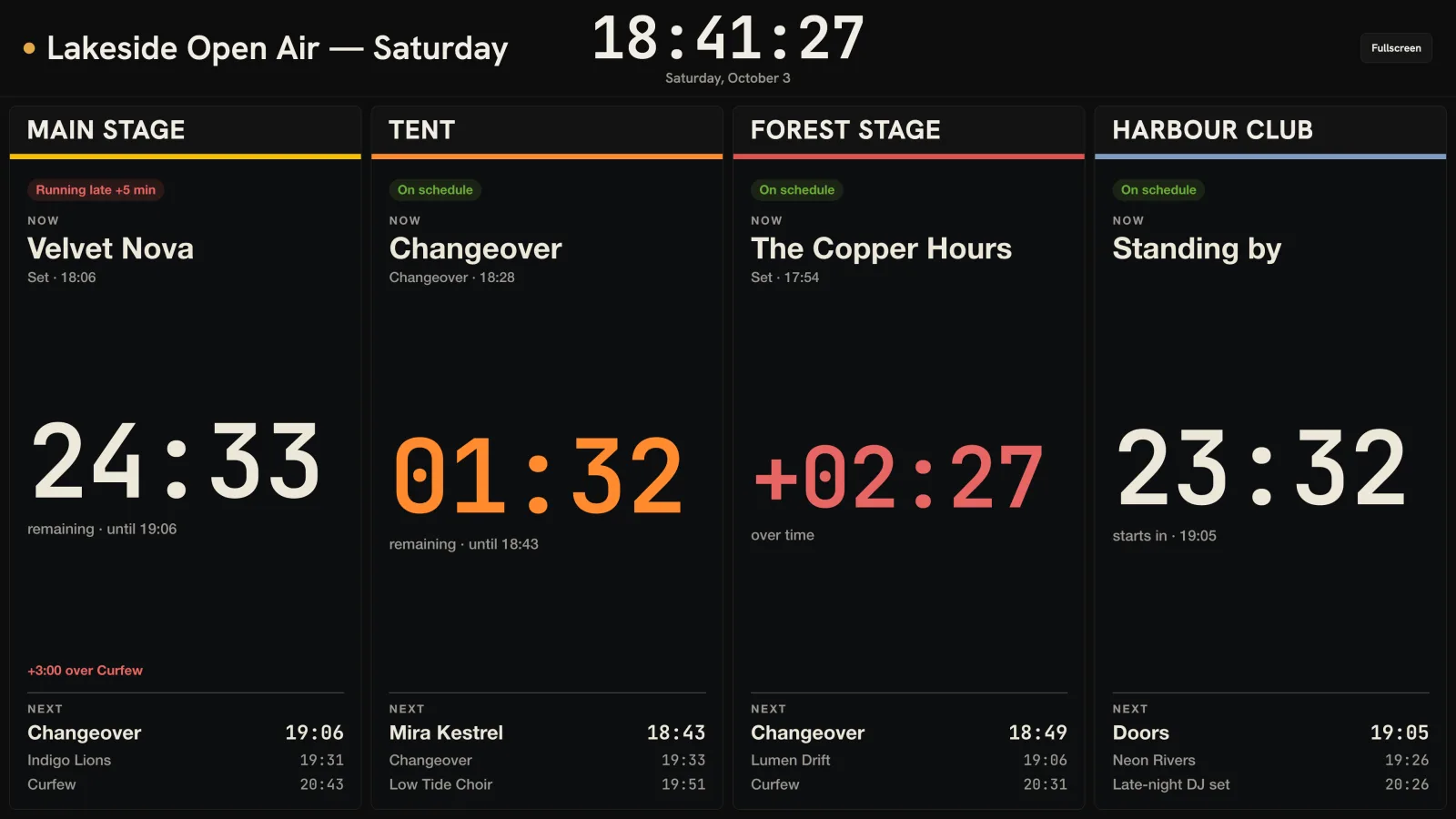
Each lane is a stage’s own share link, so it follows that stage’s operator within seconds: when the main stage runs late or a changeover ends early, the lane shows it. On a phone the lanes are stacked; the wall is made for a landscape screen.
What each lane shows
- Now: the act or slot on stage with its start time — before the first slot, “Standing by”.
- A big countdown to the end of the slot, or to the first slot before the show starts. It turns orange in the last two minutes, and a set that runs over counts up in red (+02:27, “over time”).
- The stage’s delay: “On schedule”, “Running late +5 min” or “Running early”.
- How far the stage runs over or under its next fixed time, such as Curfew, Doors or Broadcast: “+3:00 over Curfew”.
- Next: the following three slots with their times.
- Cues, and stage messages the operator marks for crew screens. A blackout turns the lane black.
- The lane flashes when a slot changes or runs over — the wall never makes a sound.
Setting one up
- Share each stage’s timetable first (Share in Show Clock).
- In Share, tap Multi-stage wall ↗ — the wall page opens in a new tab.
- Name the wall and fill at least two lanes: pick one of your own shared timetables, or paste a Show Clock share link another operator sent you. A lane label is optional; without one, the lane shows the timetable’s name.
- Save, then open the wall link on the screen and press Fullscreen.
Creating and editing walls needs the Show Clock licence; an account holds up to 20 walls. Watching one never needs anything: the wall link opens in any browser, without an account. Change the lanes and the screen reloads itself within a minute.
Time on the wall
The header clock and every lane run on the server’s time, not the screen’s. A venue TV whose own clock is off still shows the right time — and if it is off by more than a minute and a half, the wall says so and corrects every time on it.
Times show in the stages’ time zone, named under the header clock. If the lanes are in different time zones, the header says “Mixed time zones” and every lane names its own.
What the wall does not do
The wall only displays. It has no buttons and makes no sound, and nobody can drive a show from it: every stage keeps running its own timetable, delay and Next from its operator’s device. If the network drops, a lane keeps counting from the last schedule it received and says “Reconnecting… showing the last known schedule”; a lane whose share link was deleted or has expired says “Link not found”.
The wall link is the key to the wall, like a share link: anyone who has it can watch, so share it with the people who should see it.
Frequently asked
How many stages fit on one wall?
Two to five. Each stage is one lane, side by side on a landscape screen.
Do the people watching need an account?
No. The wall link opens in any browser without an account or an install. Only creating or editing a wall needs a Squaresmile account with the Show Clock licence.
Can one wall show stages run by different operators?
Yes. A lane can be one of your own shared timetables or any Show Clock share link another operator sent you. Each stage stays with its own operator.
Does the wall show curfew and delays?
Yes, per stage: the delay (“Running late +5 min”), how far the stage runs over or under its next fixed time such as Curfew, and a set that runs over counting up in red.
Show Clock · Multi-stage wall
One screen for the whole site.
Show Clock is a one-time purchase: a stage clock and running order per stage, crew links without an account, curfew that never moves when you run late — and the wall that puts every stage in view.


